

Nintendo eShop 50 GBP
£50.00
 Add To Cart
 Add To Cart
Nintendo Switch Online
Enhance your gaming experience!
Online play
Dive into co-operative and competitive
games online
NES™ & Super NES™
Nintendo Switch Online
Play a growing library of classic games
with added online modes
Save Data Cloud
Make Cloud backups of your save data and more
Smartphone app
Connect with friends via a dedicated app
on your smartphone or tablet
Exclusive offers for members
Enjoy offers that are only available to
members
Legal notices for Nintendo Switch Online prepaid code
Digital code for:
Nintendo Switch Online 3-month (30-day) membership £6.99 Nintendo eShop value
Only compatible with Nintendo Switch. This code can only be used in the European Nintendo eShop and where the Nintendo Switch Online membership is available.
To use the code, you must have access to a wireless internet connection, create or link a Nintendo Account and accept the Nintendo Account Agreement. The Nintendo Account Privacy Policy applies.
This code:
* can only be redeemed once.
* cannot be resold, exchanged, refunded or otherwise redeemed for cash.
* will not be replaced by Nintendo or the retailer if lost, stolen or otherwise used without your permission.
Nintendo eShop value: Cost of a 3-month (30-day) Nintendo Switch Online membership in Nintendo eShop. Prices at retail may differ.
How to redeem this code: Select "Redeem Code" in Nintendo eShop on a Nintendo Switch console and follow the on-screen instructions, or visit the official website (via a computer or other device): https://ec.nintendo.com/redeem
Issued by Nintendo of Europe GmbH.
You can buy Nintendo Switch Online 3 Month UK quickly and safely at the best prices guaranteed via the official retailer uk.etail.market
Activation on Nintendo
You can see the instructions to redeem a software download key in Nintendo
eShop for Nintendo Switch games.
Extra info:
You will need internet connection and Nintendo account to access the Nintendo
eShop system.
In order to reach an assistant page for Nintendo Swith
Online redeeming transaction, you can click here.
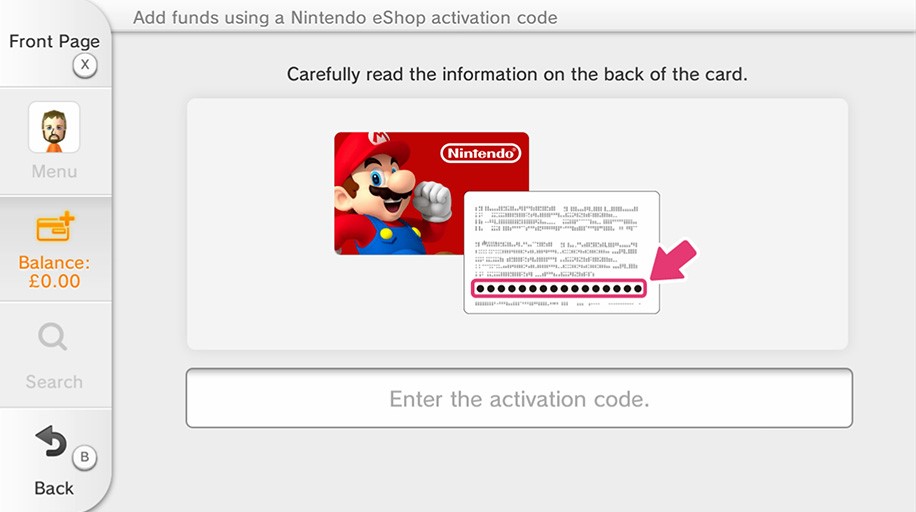
Steps for activation:
1) First, click to "Nintendo eShop" on the HOME menu to launch
Nintendo eShop.
2) Then, click the user account you want to use.
3) Click the "Redeem Code" that located in the
left side of screen.
4) Enter your key which is given on the orders page of
eTail.Market.
5) Some of retailer cards related to Nintendo may include
both "download code" and "control number". On this point,
make sure you are using "Download Code", it is generally begins with
B letter and does not includes any hyphen between the numbers. You should not
use "Control Number". This control number begins with S letter and
includes hyphends.
6) Symbols and letters (such as commas, hyphens, O, I, Z)
that are not used with prepaid codes will be inactivated on the screen
keyboard.
7) The software icon will be showed on the HOME menu with a
download status bar. When the game downloading is complete, the status bar will
be disappeared.
8) Follow the steps showed to activate the game. You are
ready to play your game!
 Add To Cart
Add To Cart
Add To Cart
Add To Cart
Add To Cart
Add To Cart
Add To Cart
Add To Cart
Add To Cart
Add To Cart
Add To Cart
